


Google OAuth2 Authentication#
        sequenceDiagram
    participant App as Your App
    participant Browser as User Browser
    participant Google as Google OAuth2
    App->>Browser: Redirect to Google login URL<br>with client_id + scopes + redirect_uri
    Browser->>Google: User authenticates + grants permission
    Google-->>Browser: Redirect to redirect_uri with auth code
    Browser-->>App: Deliver auth code via callback
    App->>Google: POST token exchange<br>code + client_secret + code_verifier
    Google-->>App: Access Token + ID Token + Refresh Token
    App->>Google: Verify ID Token (verify_oauth2_token)
    Google-->>App: User info (email, name, sub)
Install required packages#
pip install google-auth-oauthlib google-auth
Create a Google OAuth Client#
Click Create Credentials → OAuth client ID
Choose Desktop App
Download the JSON file (e.g.,
client_secret.json)Put the file in your working directory.
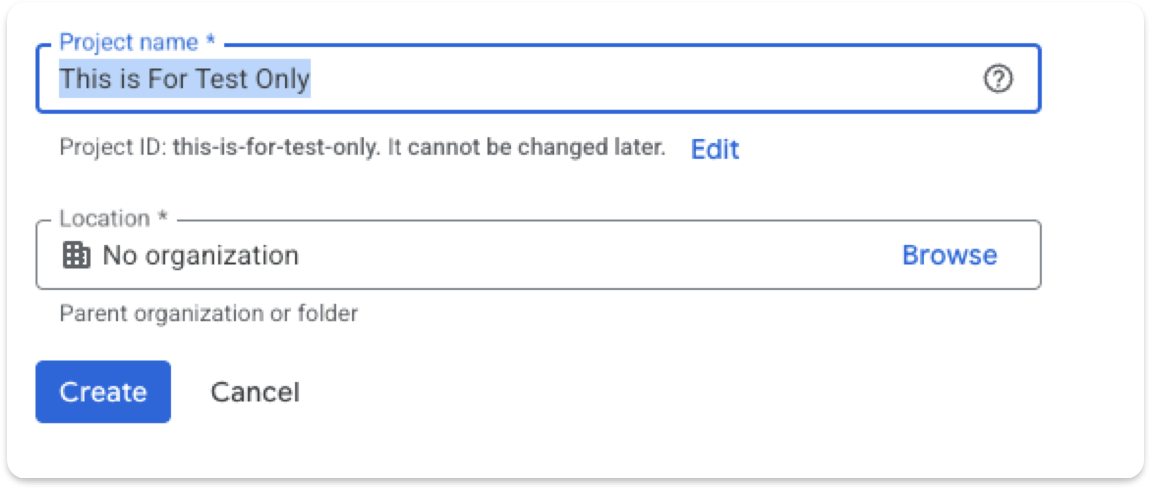
Minimal Working Code Using google-auth-oauthlib#
This code:
Opens Google login in your browser
User logs in
Google redirects back to a local server
Code retrieves the tokens
from google_auth_oauthlib.flow import InstalledAppFlow

SCOPES = [
    "openid",
    "https://www.googleapis.com/auth/userinfo.profile",
    "https://www.googleapis.com/auth/userinfo.email",
]

CLIENT_SECRET_FILE = "client_secret.json"

flow = InstalledAppFlow.from_client_secrets_file(
    CLIENT_SECRET_FILE, SCOPES
)

# Run local server — this opens the Google login page
credentials = flow.run_local_server(port=8080)

print("Access Token:", credentials.token)
print("ID Token:", credentials.id_token)
print("Refresh Token:", credentials.refresh_token)
print("User logged in successfully!")
Extract User Info#
from google.oauth2 import id_token
from google.auth.transport import requests

request = requests.Request()

user_info = id_token.verify_oauth2_token(
    credentials.id_token,
    request,
    audience=flow.client_config['client_id']
)

print(user_info)
# {'iss': 'https://accounts.google.com', 'email': 'user@gmail.com', 'name': 'Name', ...}
Implementing the OAuth2 Flow Manually#
To understand how Google OAuth2 works, here is an implementation of the local callback server without the InstalledAppFlow library.
        sequenceDiagram
    participant Script as Python Script<br>AuthHttpServer
    participant Browser as Browser
    participant Google as Google OAuth2
    Script->>Script: Generate PKCE code_verifier + code_challenge
    Script->>Browser: webbrowser.open auth_url<br>with code_challenge
    Browser->>Google: User logs in + grants permission
    Google-->>Browser: Redirect to localhost:8765/callback?code=...
    Browser-->>Script: GET /callback delivers auth code
    Script->>Script: threading.Event.set stop server
    Script->>Google: POST token exchange<br>code + code_verifier + client_secret
    Google-->>Script: tokens JSON (access_token, id_token)
import webbrowser
import http.server
import socketserver
import threading
from urllib.parse import urlparse, parse_qs, urlencode
import urllib

import base64
import os
import json
import hashlib

import requests


class Handler(http.server.SimpleHTTPRequestHandler):
    def do_GET(self):
        query = urlparse(self.path).query
        params = parse_qs(query)

        if "code" in params:
            self.server.shared_data['auth_code'] = params["code"][0]
            self.send_response(200)
            self.end_headers()
            self.wfile.write(b"Authorization received. You can close this tab.")
            self.server.event.set()
        else:
            self.send_response(400)
            self.end_headers()
            self.wfile.write(b"No authorization code found.")


class AuthHttpServer(socketserver.TCPServer):
    AUTH_URL = "https://accounts.google.com/o/oauth2/v2/auth"
    TOKEN_URL = "https://oauth2.googleapis.com/token"

    def __init__(self, server_address, client_secret_filepath):
        super().__init__(server_address, Handler)
        with open(client_secret_filepath, "r") as f:
            data = json.load(f)

        self.client_id = data["installed"]["client_id"]
        self.client_secret = data["installed"]["client_secret"]

        self.shared_data = {}
        self.event = threading.Event()
        self.code_verifier, self.code_challenge = self._generate_pkce()

        self._redirect_uri = f"http://{server_address[0]}:{server_address[1]}/callback"

    def _generate_pkce(self):
        code_verifier = base64.urlsafe_b64encode(os.urandom(40)).rstrip(b'=').decode('utf-8')
        code_challenge = base64.urlsafe_b64encode(
            hashlib.sha256(code_verifier.encode('utf-8')).digest()
        ).rstrip(b'=').decode('utf-8')
        return code_verifier, code_challenge

    def start_server(self):
        socketserver.TCPServer.allow_reuse_address = True
        with self as server:
            server.handle_request()

    def auth(self, extract_auth_code=True):
        params = {
            "response_type": "code",
            "client_id": self.client_id,
            "redirect_uri": self._redirect_uri,
            "scope": "openid email profile",
            "code_challenge": self.code_challenge,
            "code_challenge_method": "S256",
            "access_type": "offline",
            "include_granted_scopes": "true",
        }
        auth_url = AuthHttpServer.AUTH_URL + "?" + urllib.parse.urlencode(params)

        webbrowser.open(auth_url, new=1)

        thread = threading.Thread(target=self.start_server)
        thread.start()

        self.event.wait()

        if extract_auth_code:
            return requests.post(AuthHttpServer.TOKEN_URL, data={
                "code": self.shared_data['auth_code'],
                "client_id": self.client_id,
                "code_verifier": self.code_verifier,
                "client_secret": self.client_secret,
                "redirect_uri": self._redirect_uri,
                "grant_type": "authorization_code",
            }).json()

        return self.shared_data['auth_code']


auth_server = AuthHttpServer(("localhost", 8765), client_secret_filepath="client_secret.json")
result = auth_server.auth()
print(result)
Comparison: Library vs Manual Implementation#
Aspect |
Manual ( |
|
|---|---|---|
OAuth flow handled |
Manually build auth URL, start local server, capture code, exchange tokens |
Fully handled by the library |
PKCE handling |
Explicitly generate |
Automatically handled |
HTTP requests |
Use |
Library internally requests token and creates a |
Local server |
Manually run a server with |
|
Summary: InstalledAppFlow saves significant boilerplate. Don’t manually generate PKCE or parse query strings unless you need fine-grained control.